Automation in Archviz: the unglamorous shortcut that actually works
- Vladyslav Alyeksyenko
- Feb 5
- 10 min read


If you’ve spent more than five minutes around “AI content” lately, you’ve probably met them.
The arrogant promoters who talk about “prompt engineering” like it’s a rocket science in which they have a black belt, sprinkle in a few screenshots, then try to sell you a course, humbly saying it that you are actually lucky to get this "limited offer" because normally they price it at 299$ and then put a timer for a good measure making you think that the offer will expire... Well, it doesn't, it's just this sales technique to fool your brain into a state of FOMO. Let's make it clear, those are just some bad apples, and while they might have some knowledge to gain from, I feel revulsion at such methods of selling, it makes me feel like a cattle on the way to slaughterhouse, or at the very least, I see that they think of their potential buyer as fools who are easily manipulated. Despite that, not everything in this field is tainted and smells weird. Some of the AI automation promoters are genuinely helpful and humble, and I’ve learned a few good things from people like that (even from the nasty ones too, they aren't total dumbasses, you know, they just think they are smarter than everyone else ). But a loud chunk of what I came across felt like performance first, reality second.
So I want to approach this from the opposite direction: not as “AI will replace everyone” (Boy, does this way of thinking tire me) motivational poster or ¨stop using AI because it is bad¨ demotivational monologue (another nasty extreme). Just an honest look at what automation did for my archviz work, why it mattered, and what I actually built.
The real job: fewer clicks, fewer mistakes
When people hear “automation”, they imagine robots rendering entire projects while you sip coffee. In practice, the most valuable automation I’ve done is painfully boring.
It’s the repetitive stuff that quietly eats your week:
resizing the same images for different social media platforms,
copy-pasting the same caption in seven places,
juggling variations of the same text because each platform has different limits and word count
opening the same upload pages again and again,
scheduling posts manually and hoping you don’t forget,
writing outreach messages that follow the same structure, just with different names, roles, and companies.
The funny part is that this boring layer is also where you lose consistency. Not because you’re careless, but because humans are not designed for perfect repetition. If you do a task 200 times, you will eventually misname a file, forget a hashtag, paste the wrong link, or upload the wrong crop.
Automation is not just “faster”. It’s also “less random”.
The trick is learning to spot what can be automated. My rule is simple:
If an action repeats and its inputs are predictable, it’s a candidate.
Predictable inputs can be as basic as “image goes in, output needs to be 1080×1080” or “CSV row goes in, draft message comes out”. You don’t need a complex pipeline to start. You need one annoying problem you are tired of doing manually. In fact boredom is a clear indication that you brain is not exactly working at it's full potential and engaged, therefore you are doing a task that you do at your muscle memory, which can be done by a script.
I was at zero, and the code still happened
I’m not saying this to sound inspirational. I’m saying it because I used to believe coding was a locked room. If you didn’t start early, you were late forever. As I kid I gave it a go and I can't say my breath was taken away. In fact I found it pretty boring, and that deterred me from pursuing this field further.
Turns out, the locked room is mostly fear and terminology.
Once I began building small scripts with LLMs, I accidentally learned fundamentals:
how inputs/outputs work (files, paths, formats),
why “state” matters (where does the app store data, what happens after restart),
how to debug instead of guessing,
And here’s a side effect I did not expect: once you understand even the basics, it becomes much harder for salespeople to fool you.
Not in a paranoid way. More like… you can finally look at a tool and ask: “Is this actually doing something complex, or is it just a polished UI around a simple script?”
Sometimes the answer is: “It’s complex, pay the money.” Sometimes it’s: “I can build 80% of this in a weekend and it will fit my workflow better than any subscription ever will.”
The tools: free LLM vs paid, and why IDE agents feel different
I started where most people start: the free tier of ChatGPT.
And to be fair, it already changes a lot. Even the free tier is good for brainstorming, outlining, and getting unstuck when you don’t know what to google. The problem is reliability. When you’re a total beginner, you don’t have the instincts to know when the model is confidently wrong. You copy a snippet, it fails, you give it 30 log messages with errors until it does a basic task, brush away the sweat from an eyebrow, press run on the script, and it fails again... This is how you spiral into “maybe coding isn’t for me”.
The paid versions made a noticeable difference for me in two ways:
More consistent code suggestions (less “sounds right” code, more “runs first try” code) Yes, I am not kidding, it is that significant.
Faster iteration. Not just speed of typing, but speed of thought. You ask, you test, you adjust, you move.
Then a bigger jump happened when I stopped treating the model like a chat buddy and started using it like a tool inside my workflow.
Using an agent-style setup (for example Codex inside VS Code) feels different because it can work with your actual project context. It can see your files, follow your folder structure, keep changes consistent across modules, and help you iterate without constantly re-explaining what your app does. It also pushes you toward a more “software-ish” way of thinking: small changes, test, repeat.
It doesn’t make you a developer overnight, but it does something important: it lowers the friction enough that you keep going. I once came across one of those "prompt designers" (yes some of them chose this humble nomenclature) course where he wrote something along the lines: "you should use paid subscription to ChatGPT, and if you do not understand why - we have nothing to talk about". Aside from this insecure and outright pathetic brush away, after some time of using this tool on paid subscription I realize that the difference is quite significant. Yes, you pay something like 20$/month (ChatGPT Plus) but in terms of time you save and the nerves - it is definitely worth it if you use this tool daily.
What I automated (a few concrete examples)
This is the part that matters. Not the theory. The actual scripts.
1) LinkedIn outreach drafts, generated from real data
Outreach is one of those activities where the structure repeats, but the details change.
Name, role, company, maybe a link. The core message stays the same, but you still end up rewriting the same paragraphs. And if you try to do it fast, you sound generic. If you try to do it perfect, you never send anything and there is a big chance no-one will read your message anyways.
So I built a generator that takes a LinkedIn Connections export CSV (and even profile PDFs) and produces per-contact drafts in English and Czech. It’s intentionally conservative. It personalizes only what the data actually contains (role, company), so it doesn’t hallucinate someone’s achievements and pretend it’s research.
It outputs everything into a clean Markdown file (or CSV), where each person gets:
a header with their name and meta,
an English version,
a Czech version.
Then I added a simple GUI on top of it, including drag and drop PDFs, a template picker (architects / archviz company / real estate), message length, portfolio link, signature, and per-person notes.
Is it glamorous? No.
But it takes a task that used to be “I’ll do it later” and turns it into something I can do in one sitting without hating my life.

2) ZenPulse: “prepare once, publish everywhere” (auto + assist)
The second project is the one that made me realize how much time I was leaking.
Every time I finished a piece of work, posting it was a mini-punishment:
resize for Instagram feed and differently for stories,
resize for LinkedIn,
keep a consistent caption, hashtags, link,
open each platform,
upload,
paste,
repeat.
And that’s before you even get into scheduling.
So I built a small desktop app (ZenPulse) that lets me prepare a single “campaign” (images + master text + hashtags + link) and then publish it across platforms.
Here’s the important part: it supports two modes.
Auto mode for platforms with official APIs (Instagram Graph API and LinkedIn).
Assist mode for platforms without clean APIs (ArtStation, Behance, CGConnect, Upwork).
Assist mode sounds “less automated”, but it’s still a big win. ZenPulse exports the assets, generates the common variants (Instagram square 1080×1080, story 1080×1920, LinkedIn 1200×627), copies the caption to the clipboard, opens the upload page in your browser, and opens the export folder. You still click “Upload”, but everything else is handled.
I also built a local scheduler that can publish at a future time (with one honest limitation: scheduling only runs while the app is open, because I’m not running a server for this. It’s a desktop tool after all.

The result is simple: the “marketing output” of my studio becomes more consistent and takes dramatically less mental energy.
3) Invoicer: Connected to my Clockify time tracker:
A lovely time saver that take the information from my Clockify account about the tracked projects, extracts information like Client name, dates, rate etc and plugs it into UI where I can select each parameter individually - after that places all the information into Invoice template I did in Photoshop, saves it as pdf into the folder where I store invoices, and makes a draft message to the chosen client with invoice already attached.

Multiple steps, free and no limitations on amount of clients or currency. Complete win in 1 minute compared to atleast 5-10 minutes every time I prepare invoices.
4) Archiver: Cleanup after completed project
After each project I always do the same actions:
removing exr/cxr files
backs up files in case something goes wrong
deleting Input files from the client
collapsing folders inside of maps folder
zip archive latest 2 iterations of psd and max files and deleting everything else
asks for my confirmation, if I press yes it proceeds, if no, it returns all backed up files to where they were previously.
moves the folder to my deep storage drive
This script does all the above and does it marvelously. One thing I realized in the process of working on this script is that I not just saving myself 20-30 minutes of manual work, but also my attention, because while I am doing archiving, I can't fully focus on some other task since it need my confirmation to delete or archive something.
5) Mail watcher: saving attachments to specific folder
Every time I receive an email with a certain structure in the Subject - it will download all attachments and email body, save it to a folder corresponding to the project mentioned in the subject, notify me and prompt to take me there opening the folder right away.
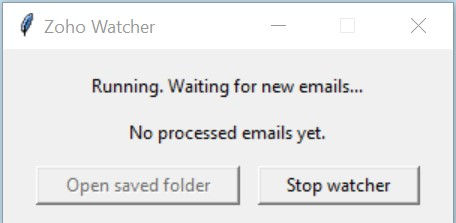
Simple and not that significant at first sight, but it makes a difference and makes sure I do not miss any changes to the project.
This is just a fraction of tools I created and plant to expand on. Luckily, I can always adjust those scripts at any point and add functionality.
Build vs buy: the uncomfortable truth
There are excellent tools on the market. I use plenty of paid software and I’m not allergic to subscriptions when they actually earn their place.
But I’ve also learned something that feels almost rude to say out loud:
Sometimes what you build yourself works better than what’s available.
Not because it’s objectively better. Because it’s yours.
It matches your naming, your folder structure, your platform list, your preferences, your weird habits, your constraints. There are no “enterprise features” you don’t need. No pricing tiers that punish you for growing. No vendor lock-in disguised as convenience.
And once you build one useful tool, you start seeing opportunities everywhere. In fact, it became a sort of an obsession of mine to the point that I was procrastinating doing other important tasks. I believe it is because you get immediate dopamine hit once you build a script that works perfectly while tasks like outreach and cold calls may or may not give you any immediate reward and therefore create more friction to convince yourself to do this specific type of work.
The bigger shift: ideas no longer die at the “implementation” stage
Before, if I had a clear idea but no technical ability, the options were limited:
hire someone (expensive, slow, risky),
or forget it.
Now there’s a third option: prototype it yourself, with help.
That doesn’t mean you never need professionals. If you’re building something mission-critical, or you need real infrastructure, you should involve people who do that for a living.
But for internal workflow tools, the kind that save you hours every week, the barrier is suddenly reasonable. You can build a version 1, test it on your own workflow, polish it, and only then decide if it deserves more investment.
That alone is a massive change for small studios.
Archviz is full of automatable pockets (if you’re willing to polish)
In archviz specifically, automation has a lot of low-hanging fruit:
batch exporting and resizing deliverables,
enforcing consistent naming conventions,
generating project folders and templates,
converting formats (JPG/PNG/WebP, variants for web and socials),
preparing consistent before/after comparisons,
tracking revisions and client feedback loops,
automating AI generated moodboards and references
scheduling publishing and cross-posting.
The catch is the part nobody advertises: you pay upfront.
Automation is a trade. You invest time once to save time later, and you usually need a few iterations until it fits perfectly. The payoff is that once it’s polished, it quietly saves you hours every month, and it keeps saving them.
Closing thoughts (the non-magic version)
I’m not interested in worshipping AI (Yet), and I’m definitely not interested in selling “secrets”. I’m interested in tools that make the work cleaner, faster, and more consistent.
For me, automation became valuable the moment I stopped chasing grand transformations and started removing small frictions:
drafts instead of blank pages,
campaigns instead of scattered uploads,
one caption instead of seven copy-pastes,
predictable outputs instead of “I hope I didn’t forget something”.
If you’re in archviz and this resonates, my practical suggestion is boring on purpose:
Pick one repetitive annoyance, define the inputs and outputs, and automate just that.
You don’t need a course. You need a small win. The rest tends to follow.


Comments